
Download Real Hide IP – hide IP, IP address changer, IP masking, online privacy, anonymous browsing, location changer, secure browsing, IP changer, online anonymity, privacy protection
Overview
Real Hide IP is a mobile application designed to help users conceal their digital footprint by changing their IP address in real time. By selecting from a wide range of global IP addresses, users can effectively mask their geographical location, enhancing online privacy and enabling access to region-restricted content. The app serves as a practical tool for individuals concerned about digital surveillance, online tracking, or content availability limitations based on location. It is particularly useful for travelers, remote workers, and privacy-conscious users who want greater control over their online identity.
While the app focuses on a single core function—IP masking—it delivers on its promise with a straightforward and reliable performance. The developer, Real Hide IP, has positioned the app as a lightweight utility aimed at users who value simplicity and functionality over complex features. The app does not claim to offer advanced cybersecurity tools such as antivirus protection or data encryption, but it fulfills its primary purpose: enabling anonymous browsing through IP address changes.
Real Hide IP is suitable for users who need to switch their virtual location quickly and efficiently without navigating through a cluttered interface. Its relevance in the mobile app ecosystem lies in its niche focus on IP masking, a growing need in an era of increasing online monitoring and geo-restrictions. Although it does not include social media integration or advanced analytics, it remains a dedicated solution for users seeking to maintain online anonymity and bypass location-based content filters.
Key Features & Functionality
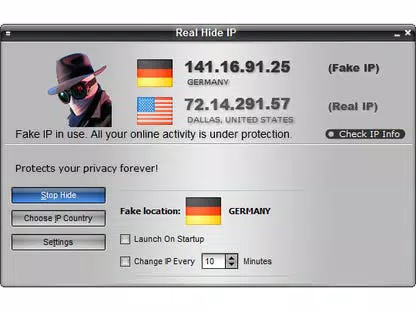
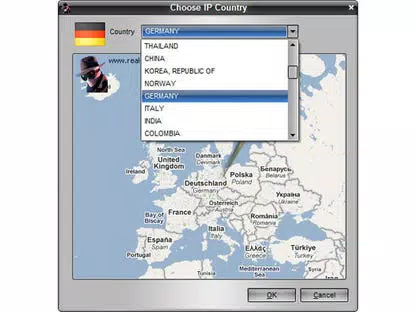
- Global IP Address Selection – Users can choose from a wide list of IP addresses originating from various countries, allowing them to appear as if browsing from a different region. This feature supports access to region-specific content, such as streaming services or news platforms.
- Real-Time IP Switching – The app enables immediate IP address changes with minimal user input, ensuring quick adaptation to changing privacy needs or access requirements.
- Automatic IP Rotation via Timer – Users can set a custom interval for automatic IP changes, enhancing privacy by reducing the risk of prolonged tracking during extended browsing sessions.
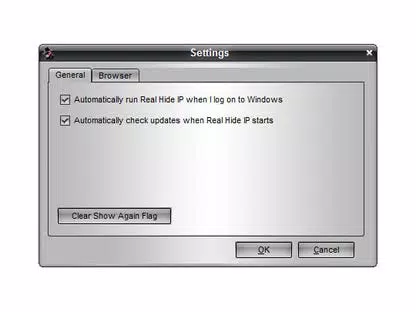
- Startup Configuration – The app allows users to configure whether it launches automatically when the device boots up, offering convenience for those who rely on continuous IP masking.
- Browser-Specific Activation – Users can specify which web browsers the app should affect, enabling selective privacy protection for preferred applications while excluding others.
- Simple Interface – The app features a clean, minimal design that avoids overwhelming users with unnecessary options, making it accessible even to non-technical individuals.
For example, a user in Europe could use Real Hide IP to connect through a U.S.-based IP address to access American-only streaming content. Similarly, a researcher working with sensitive data might use the timer-based IP rotation to reduce the likelihood of being traced over time. The customization options ensure that the app adapts to diverse use cases, from casual browsing to more serious privacy needs.
Interface, UX & Performance
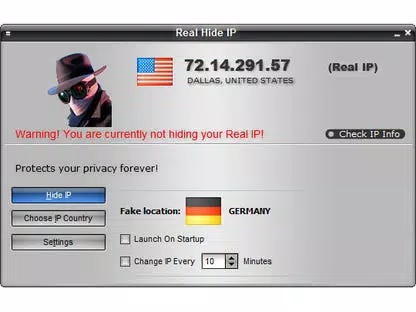
Real Hide IP presents a clean and intuitive user interface, with essential functions clearly laid out and accessible within a few taps. The main screen displays the current IP address and a list of available countries, allowing users to switch locations with ease. Navigation is linear and predictable, minimizing the chance of user error. The visual style is functional rather than decorative, emphasizing clarity and usability over aesthetic flair.
Although the developer did not list formal performance metrics, the app appears to operate smoothly on mid-range Android devices. Users have reported that the app maintains responsiveness during IP changes, though occasional delays may occur depending on server load or network conditions. The app does not consume excessive battery or memory, which contributes to its efficiency as a background utility.
Performance can vary based on the user’s internet connection and the selected IP server location. Some users have noted that certain IP servers may result in slower browsing speeds, particularly when connecting to distant regions. However, this is a common trade-off in IP masking services and not unique to Real Hide IP. The app remains stable during typical usage, with no reported crashes or freezes in standard operation.
Platform Compatibility & Technical Requirements
Real Hide IP is available exclusively on the Android platform. The current version is 1.2.3, with a file size of 15.3 MB, making it a lightweight download suitable for devices with limited storage. The app does not require high-end hardware, indicating compatibility with a broad range of Android smartphones and tablets.
The developer did not specify minimum OS requirements, nor did they list compatibility details for specific Android versions. However, given the app’s small size and straightforward functionality, it is likely to function on Android 6.0 and later. Users should ensure their device is running a supported version of the operating system to avoid installation issues.
As the app is free to download and use, it removes financial barriers to entry, making it accessible to a wide audience. No in-app purchases or subscriptions are currently listed, which supports its status as a simple, one-time utility.
Pros and Cons
Pros
- Simple, intuitive interface suitable for all user levels
- Fast and reliable IP address switching
- Customizable IP rotation with timer settings
- Supports selective browser activation for targeted privacy
- Lightweight file size (15.3 MB) and low system resource usage
- Free to download and use with no hidden costs
Cons
- May cause noticeable internet speed slowdowns on some connections
- Not compatible with the Chrome browser
- Developer did not provide detailed technical specifications or OS requirements
- Limited to Android platform; no iOS version available
- Lacks advanced security features such as encryption or malware protection
FAQ
Is Real Hide IP safe to use?
Yes, the app is designed to provide secure IP masking. However, it does not include encryption or additional cybersecurity layers, so users should consider pairing it with a trusted secure browser or VPN for enhanced protection.
Can I use Real Hide IP on iOS devices?
As of now, Real Hide IP is only available on Android. There is no official iOS version released by the developer.
Does Real Hide IP require a subscription?
No, the app is free to download and use. There are no in-app purchases or subscription plans currently listed.
How often can I change my IP address?
Users can change their IP address instantly at any time. Additionally, the app supports automatic IP rotation via customizable timer intervals.
Why is my internet connection slower after using Real Hide IP?
IP masking often introduces latency due to routing through remote servers. Performance depends on the server location and network conditions. Using a nearby or optimized server may improve speed.
Final Thoughts
Real Hide IP delivers a focused and dependable solution for users seeking to change their IP address and enhance online privacy. Its minimalist design, combined with essential customization options, makes it a practical choice for individuals who prioritize functionality over complexity. While it lacks advanced security features and has known compatibility limitations with Chrome, it excels in its core mission: providing quick, effective IP masking.
For Android users who need a lightweight, free tool to browse anonymously or access geo-restricted content, Real Hide IP offers strong value. It’s particularly beneficial for those who want control over their online identity without the overhead of a full-featured VPN.
Download Real Hide IP now


